Capture what actually happened
Manage incidents and near-misses as real instances, not log entries — a diary-based flow, tasks and watchers, regulatory escalation, and loss capture that separates actual from avoided.
Start free trialEvents you manage, not just record
Record risk events — incidents, near-misses, losses — and then actively manage them as real-world instances rather than filing them as structured log entries. Each event has a severity, the dates that matter (when it occurred, when it was reported, when it was discovered), a running diary, tasks, watchers, and a closure that captures root cause. You build the picture of what actually happens, not just what might.
A lifecycle and a diary
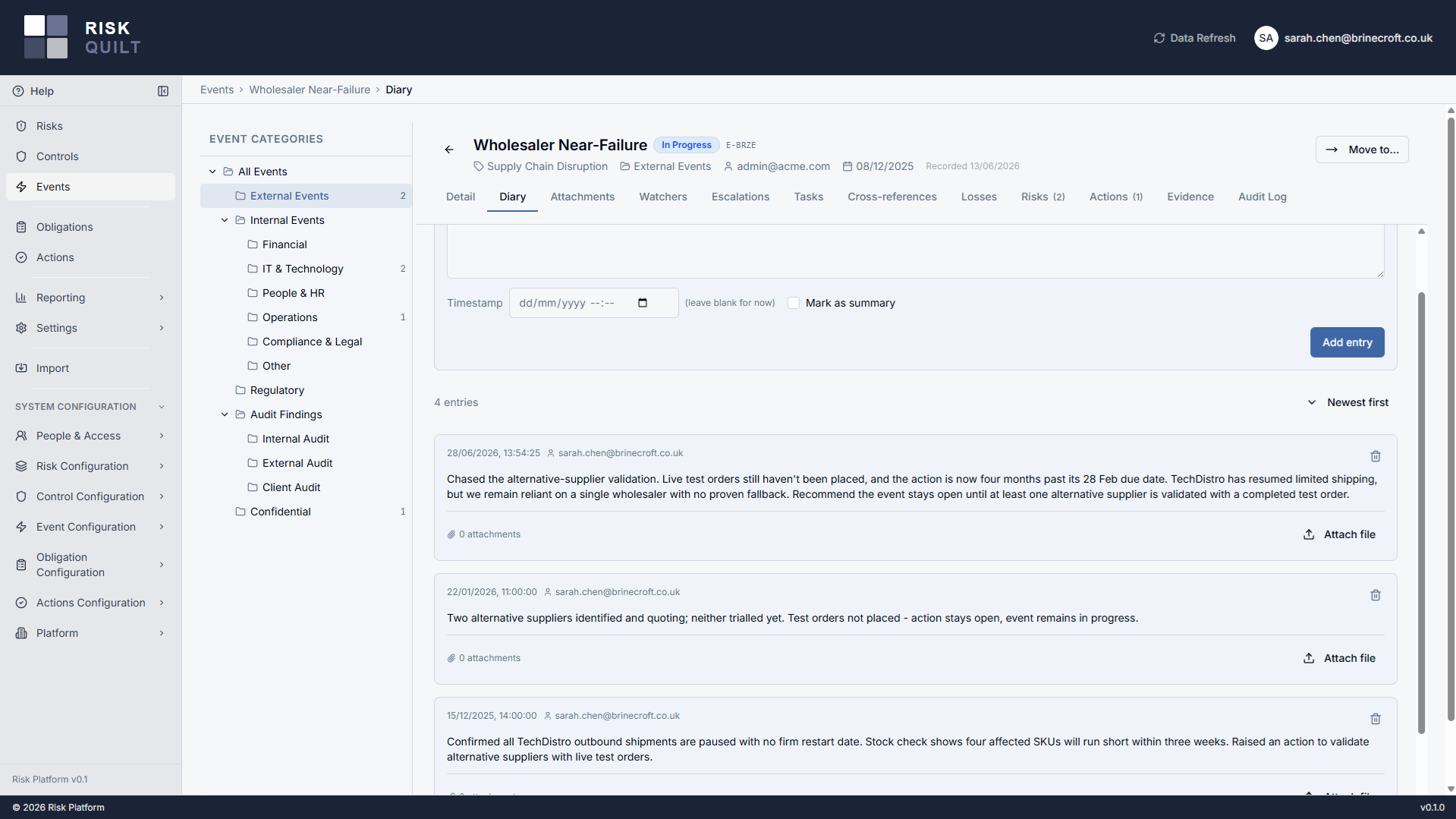
Events move through a lifecycle — pending, in progress, close-pending, closed — and can be reopened if something new comes to light. The heart of an event is its diary: timestamped entries that build a narrative as the situation develops. Entries can be backdated to when something actually happened, and marked as summaries that collapse to keep a long event readable.
Diary entries are never editable after they're written — the record of what was known, and when, stays honest. Evidence attaches to the specific entry it belongs to, and an event-wide attachments view pulls every file together in one place.
Tasks, watchers, and cross-references
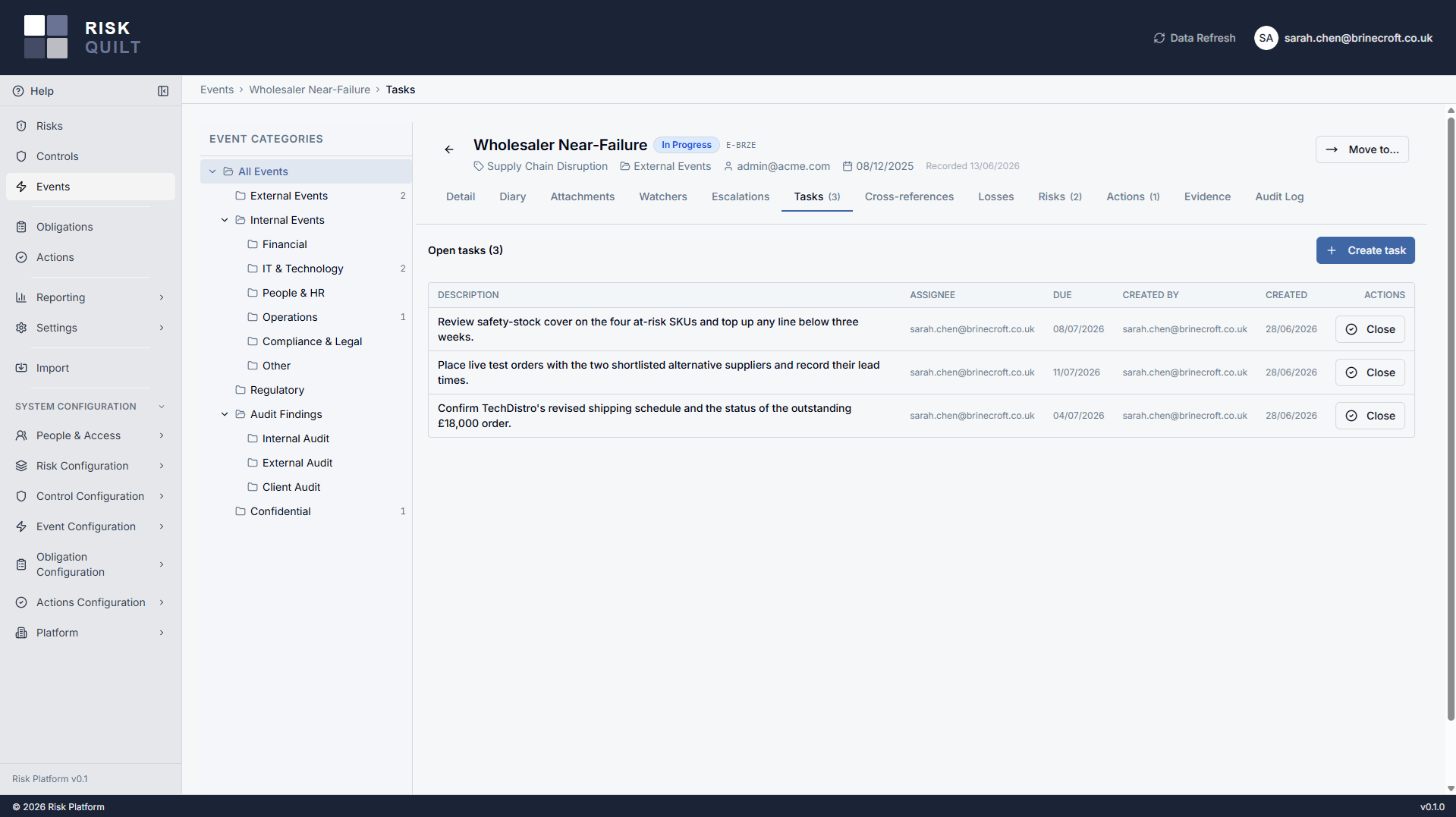
Spin up lightweight tasks against an event — a description, an assignee, an optional due date — to track the small pieces of work a live event throws off. Open tasks surface as a warning when someone requests closure, so nothing is forgotten on the way out.
Add watchers so the right people follow an event — either platform users or contacts from your tenant address book. And keep a tidy set of cross-references: labelled links out to the systems where related work lives, each pointing at a URL on your tenant-managed allowlist. They are links you control, not back-channel integrations.
Escalation, losses, and root cause
Regulatory escalation, handled internally
Raise a regulatory escalation against an event using your own tenant-configured escalation types, each with its own internal notification list. The people who need to know are told — no separate tracker, no chasing, and a record on the event of what was escalated and when.
Losses, actual and avoided
Capture losses per event, with as many loss rows as the event needs. Each row carries an actual amount, an avoided (near-miss) amount, a currency, and a tenant-configured loss type — so a single event can record real losses and avoided losses side by side. At closure, capture root cause as a category plus free text, building the data behind your loss and near-miss reporting.
Configured to how you classify events
Severities, root cause categories, escalation types and their recipients, cross-reference types, loss types, and address book entries are all tenant-managed lists — you describe events in your own language, not ours. Lists are deprecated rather than deleted, so retiring an option suppresses it from new pickers while existing events keep displaying correctly. Changes to this configuration are captured in a dedicated configuration audit log.
Events in the bigger picture
Actions
An event is an input to action. Raise actions from what happened, with owners and due dates that link back to the event that drove them.
ActionsRisks
Events sit within your register structure, giving risk owners the evidence of what has actually occurred against the risks they manage.
RisksA complete record, and the right people on it
Every event carries a complete audit log — lifecycle changes, task status, escalations, watcher changes, all attributable and timestamped. Diary entries are append-only, and on the rare occasion an entry must be removed, it is soft-deleted by an admin and shown as removed so the narrative never has unexplained gaps.
Read access follows your register permission model, so people see the events their access allows — and anyone who can read an event can choose to watch it. Write access to an event is full access: a deliberately simple model that suits managing a live situation without fighting field-level permissions.